My Journey
A travel companion designed for easy planning, quick journaling, and effortless exploration.
Role:
Ux Research, UX/UI Design
Date:
April 2025
🤝
Introduction
My Journey is a travel app that accompanies travelers throughout the entire trip. It help them to easily and quickly gather information, plan routes spontaneously, and capture moments and experiences - all in one place.
🧩
Problem
Planning a trip today often means collecting information from too many sources, only to end up with scattered, hard-to-trust recommendations. With no single place to plan, manage, and capture the journey, users end up juggling between notes, screenshots, and chats just to organize and document their trip.
🧠
Challenges
1. Information Overload & Structuring
The core challenge wasn’t finding information, it was turning scattered inputs into a clear, usable structure. Users needed a way to collect recommendations from different places and quickly organize them into destinations, days, and routes. The system had to make it easy to filter, compare, and decide- without forcing heavy setup or complex planning workflows.

2. Personalization vs. Simplicity
Travelers have very different needs: solo vs. family trips, low-budget vs. luxury, spontaneous vs. detailed planners. Creating a system that feels personalized was a delicate balance.
It needed to offer relevant suggestions based on preferences, past behavior, and real-time context, without compromising usability. The challenge was to make the app smart and adaptive, yet still approachable and lightweight.
3. End-to-End Integration
Most tools today focus on just one part of the travel experience, booking, mapping, or note-taking. I wanted to offer a unified platform where users can plan, organize, document, and share their journey. The challenge was designing smooth interactions between planning features, documentation tools, real-time updates, and external services like Google Maps and Booking, ensuring a coherent and connected flow across all stages of the trip.
📑
Research
Interviews
To understand how people currently plan their trips and whether existing tools truly meet their needs, I conducted interviews with 20 travelers. I focused on learning which platforms they use, how they collect and organize travel information, and whether they tend to update or share it with others. The goal was to uncover common frustrations and identify opportunities for a more seamless and centralized experience.
Users' Quotes:
"I keep my travel info all over the place - notes on my phone, Excel sheets, saved locations in Google Maps."
"There isn’t a convenient way to manage the trip planning. I usually end up saving things in random phone notes or chats".
“I’m often surprised to find out too late that I needed to book in advance. I wish there were specific tips about which restaurants and attractions.”
Market Research
As part of my research, I reviewed several commonly used tools for trip planning, including Google Maps, Tripadvisor, Facebook Groups, and local content platforms. I analyzed their strengths and limitations from a UX perspective, focusing on usability, information structure, personalization, and collaboration.
Key Findings:
Travel information is scattered, unstructured, and often hard to search or filter effectively.
No single platform supports the full journey from planning to real-time use to documenting and sharing.
Existing tools lack personal management, such as private notes and trip documentation.
Users would benefit from an AI-powered assistant that offers tailored suggestions and answers on the go.
Survey
To validate and expand on the interview findings, I conducted a survey with 39 participants. The goal was to learn more about users’ habits, preferences, and pain points when planning a trip.
Key Findings:
Over 60% of participants rely on recommendations from friends or online communities and perceive them as highly trustworthy sources of information.
Top frustrations include:
Information overload.
Lack of synchronization between tools.
Difficulty in documenting or sharing trip details.
More than 50% of the participants find existing tools either hard to use or lacking integration between them.
📋
Conclusions
1
Travel planning is scattered and overwhelming
Users collect information from multiple sources (Google, blogs, Facebook, notes), but find it hard to organize or reuse efficiently.
2
No centralized platform for managing the full travel journey
Most tools only cover part of the process, there’s no all-in-one solution that supports planning, live use, documentation, and sharing.
3
Users want personalized, reliable recommendations
Travelers prefer advice from other real users and would benefit from an AI assistant that offers real-time suggestions.
👷🏼♀️
Solution
A smart, centralized app for planning, managing, and documenting trips - all in one place.
Convenience: Everything in one place: plans, notes, budget, and memories.
Personalization: Smart recommendations tailored to user preferences.
Trust: Authentic insights from other travelers and your own past trips.
Control: Real-time updates and flexible adjustments on the go.
Sharing : Easy ways to share tips, photos, and itineraries with others.
👥
Persona
The On-the-Go Explorer:
Meet Yuval – Spontaneous, budget-conscious, in-the-moment

Yuval Ben David
Age: 24
Profession: Recently discharged from military service
Trips per year: 1 long trip (post-army)
Motivations
Discover new, unique places on a limited budget
Capture and share travel memories along the way
Needs
A simple and mobile way to plan daily routes in real time
A tool to manage his budget and track expenses during the trip
Pain Points
Overwhelmed by the amount of information available online
Real-time planning time-consuming and hard to manage while traveling
📖
User Stories
Based on the research insights and defined persona, I created a series of user stories to guide the feature development of the app.
Yuval is a spontaneous post-army traveler whose needs reflect the app’s key challenges: real-time decision-making, budget management, and capturing experiences on the go. His journey highlights the importance of flexibility, simplicity, and centralizing travel content in one place.
As Yuval, I want to...
Personalized Day Plan
Create a quick, personalized day plan based on my current location and preferences, so I can enjoy a dynamic and spontaneous trip without wasting time.
Trip Journal (Real-Time)
Document my trip in real time - with notes, photos, and locations, so I can keep memories and share highlights later.
Budget & Expense Tracker
Track my expenses and monitor my travel budget, so I know how much I’ve spent and how much I have left.
Saved Places & Sharing
Access saved places from earlier in the trip, so I can easily revisit or share them with friends.
🌊
User Flow
After understanding what problems we are interested in solving, I built a flow diagram that will help us make sure we have a solution for each of them.
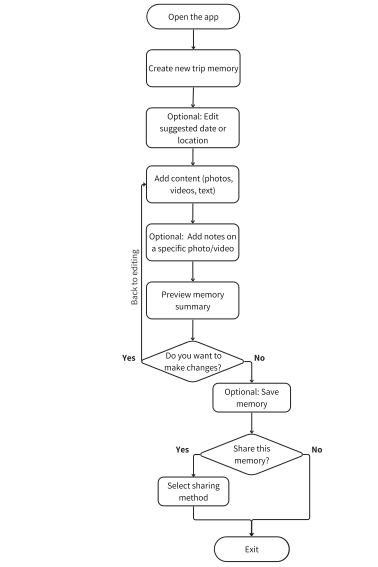
Trip Memory Flow
Allow users to document, personalize, and optionally share rich travel memories
This flow illustrates how users document a travel memory with photos, videos, and notes. The process includes reviewing, editing, and optionally sharing the memory. It supports both quick captures and rich storytelling, allowing users to personalize and revisit meaningful experiences.
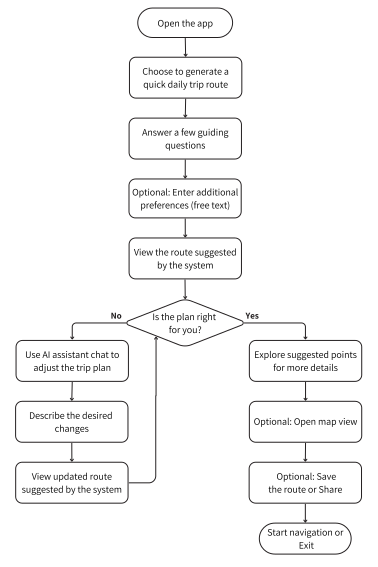
AI Route Planning Flow
Help users generate and refine a personalized daily trip route in real time
This flow outlines the AI-assisted daily trip planner. Users can enter preferences, review suggestions, and refine the route in real time. Designed for spontaneous travelers like Yuval, it enables quick, smart decisions without sacrificing personalization, saving time while keeping the trip dynamic and relevant.
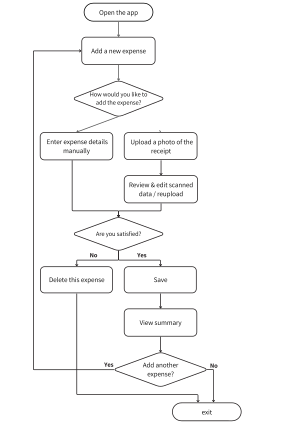
Add Expenses Flow
Quickly logging and managing trip expenses on the go
This flow outlines the process of adding a new trip expense, either manually or by uploading a receipt. The user reviews and confirms the data before saving. The option to quickly add expenses supports travelers like Yuval, who explore with a limited budget and need a simple, efficient way to track spending in real time, without interrupting the trip experience.
🖼️
Wireframes
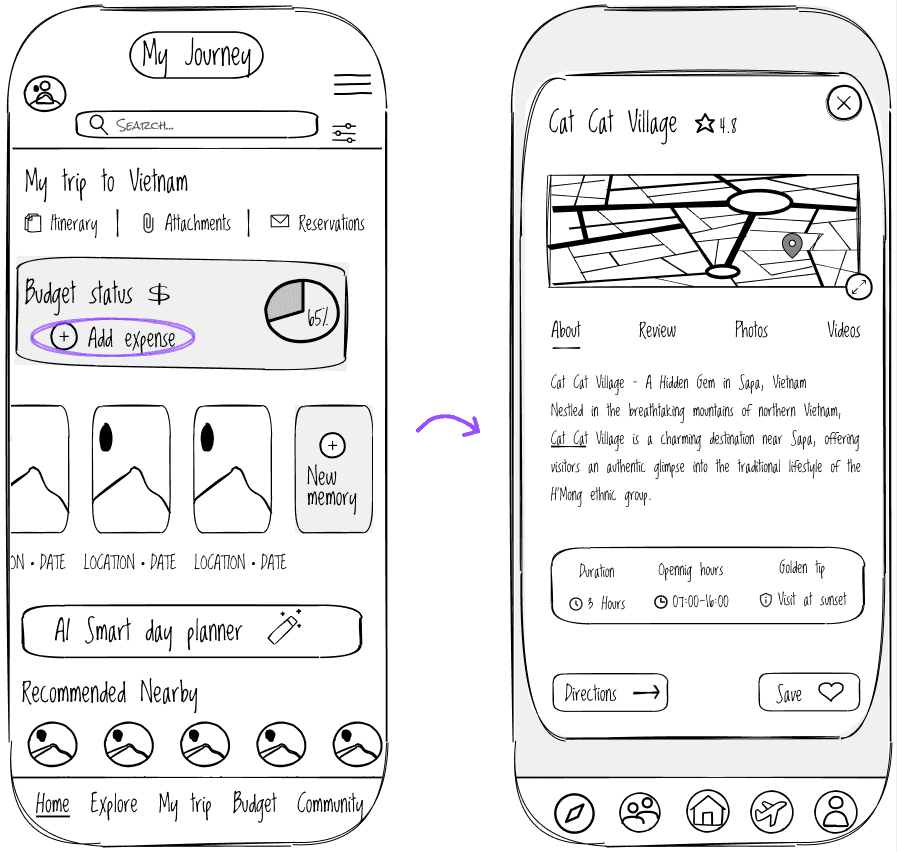
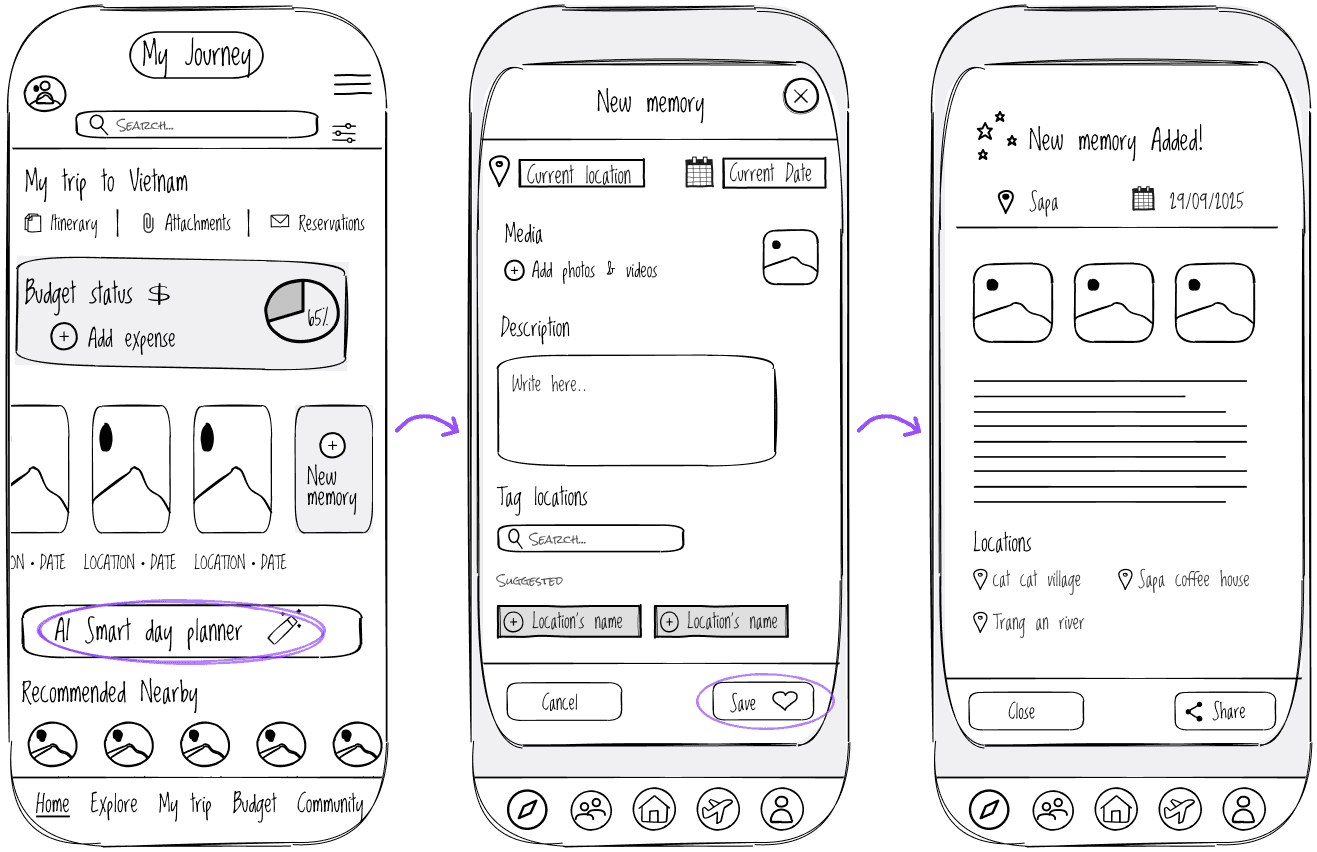
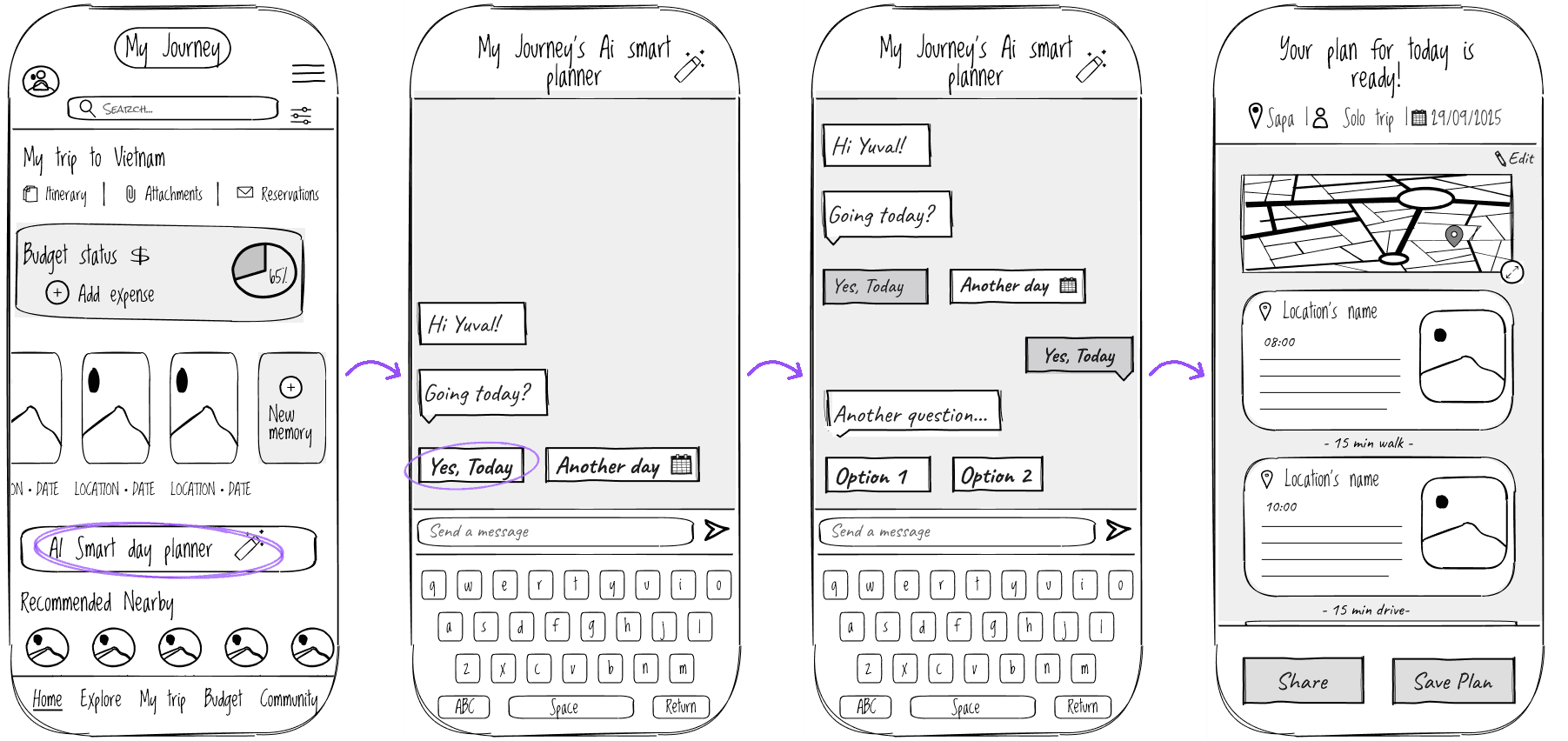
Next, I created low-fidelity wireframe sketches to define the core structure and layout of the app’s main features before moving on to detailed UI design.
The focus was on content hierarchy, screen flow, and addressing key user needs identified in the research, especially for travelers like Yuval, who require quick access, flexibility, and budget control while planning on the go.
Home Screen
New Memory
AI Smart Day Planner
🎨
Final design
AI Smart Day Planner
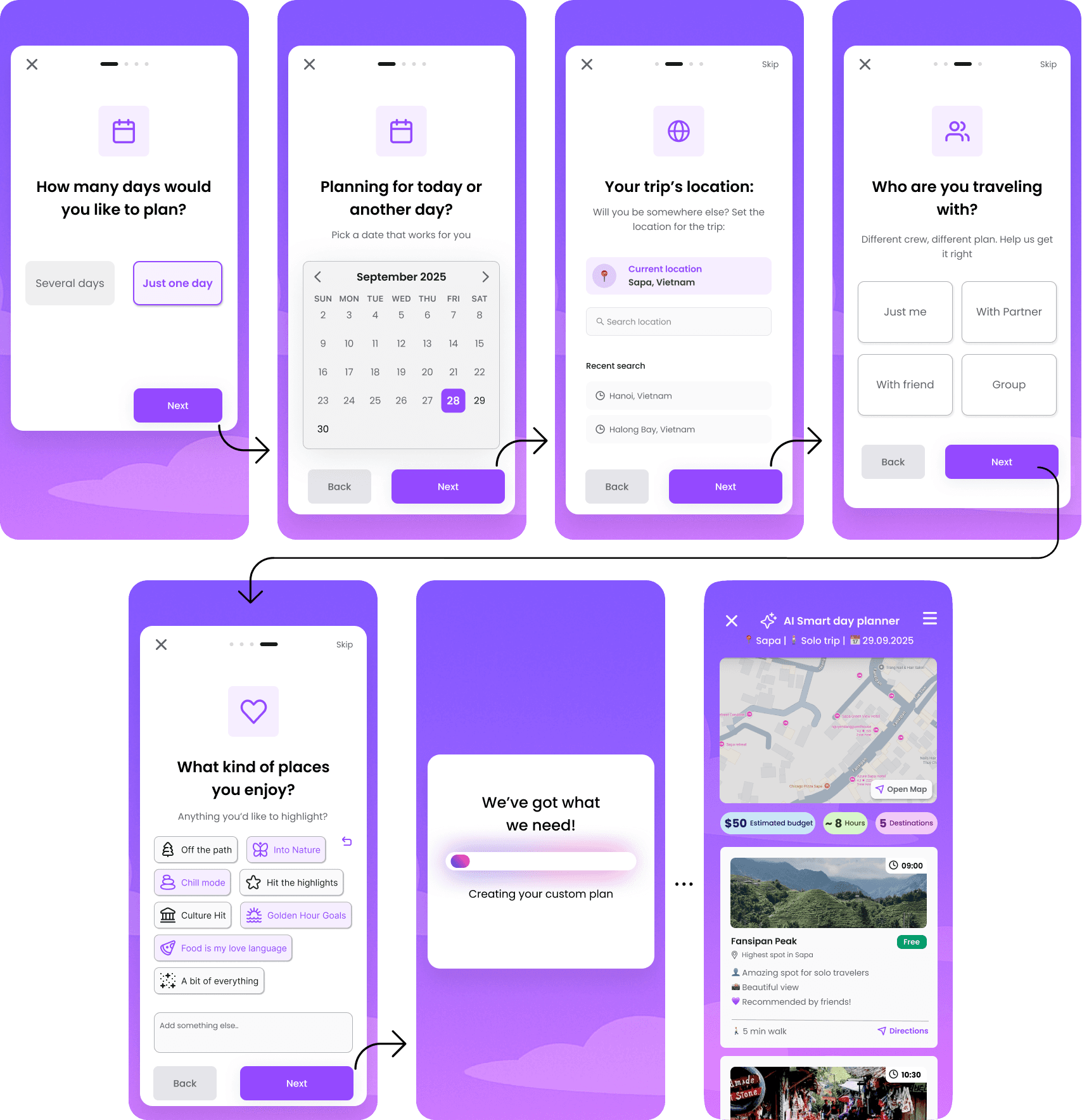
Exploring Interaction Models: Chat-Based AI vs. Guided Wizard:
Chat-Based AI
Wizard-Style Flow
I initially explored a chat interface for its flexibility, but soon realized it wasn't ideal for quick planning. The 'blank canvas' approach placed too much cognitive burden on the user, slowing down the process.
Instead of an open chat, the wizard-style planner asks only for essential details, allowing users to move quickly while the AI handles the logic behind the scenes.
Pros
Pros
High flexibility and expressiveness.
Highly familiar pattern for AI users
Lowers cognitive load by breaking decisions into manageable steps
Speeds up the process by removing unnecessary input.
Makes the AI feel proactive and helpful rather than demanding.
Cons
Cons
Puts the burden on the user to figure out what to say.
Higher cognitive load, especially for quick, everyday tasks.
Slower task completion for users who just want fast results.
Less "open-ended" than a pure chat interface.
Final Design Rationale
I chose the wizard-based approach to prioritize speed and efficiency. By applying progressive disclosure, I reduced the cognitive load while still delivering highly personalized results.
The result is an AI planner that feels efficient, approachable, and supportive - helping users reach a complete plan with minimal friction, while still preserving the benefits of AI-driven personalization.
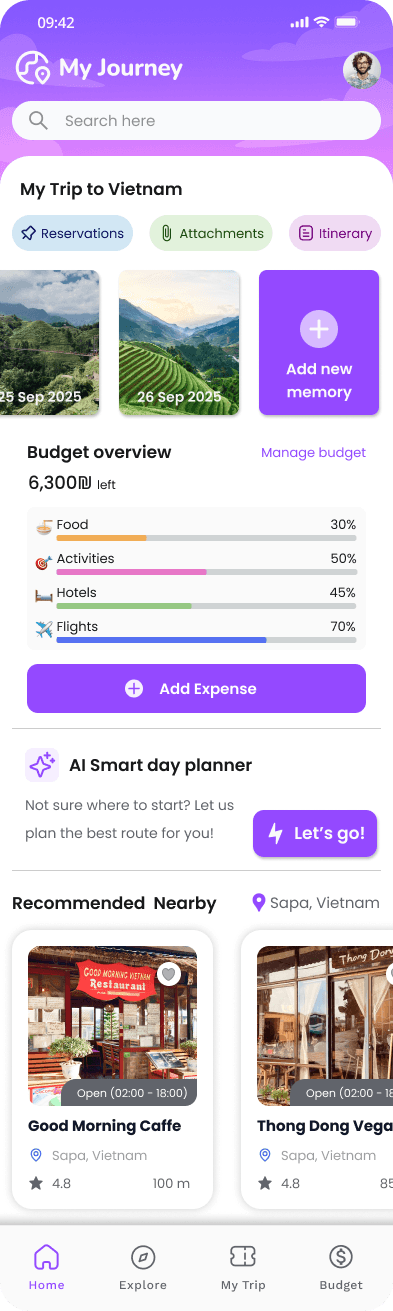
Home Screen
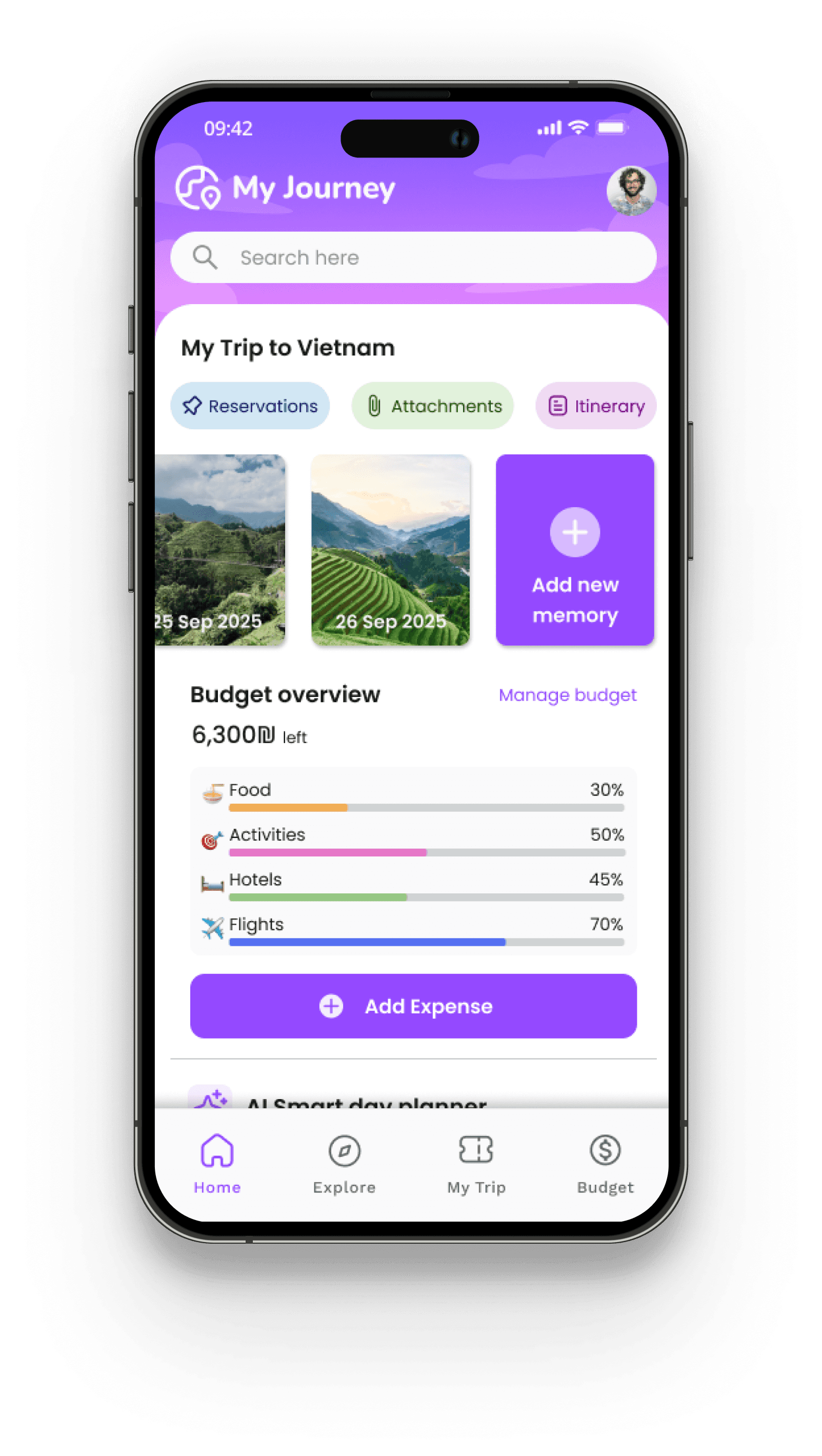
When developing the concepts, I considered a modular card-based home screen, which offers flexibility and user control but requires manual setup, versus a smart feed that delivers personalized content based on location, status, and preferences.
Based on research insights highlighting information overload and lack of synchronization in existing tools, I chose the smart feed concept: it provides an intuitive, seamless experience where relevant information is proactively surfaced, reducing cognitive load and supporting users throughout all stages of trip planning and traveling.
New Memory
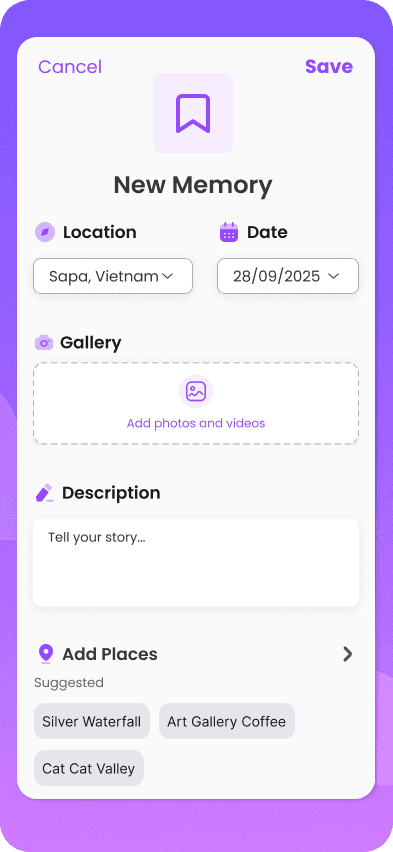
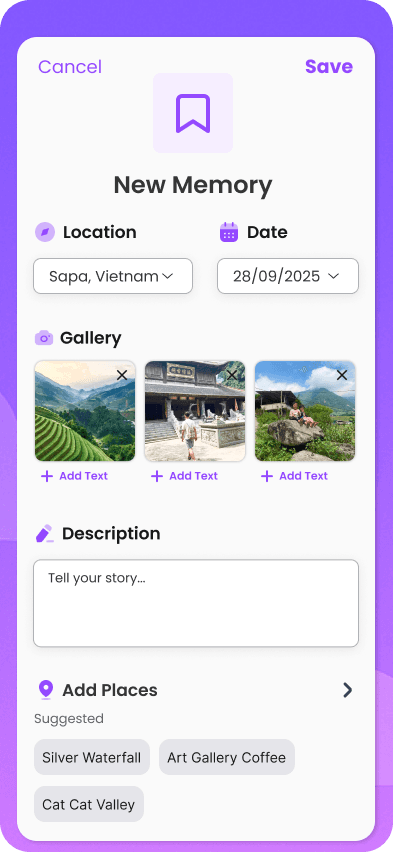
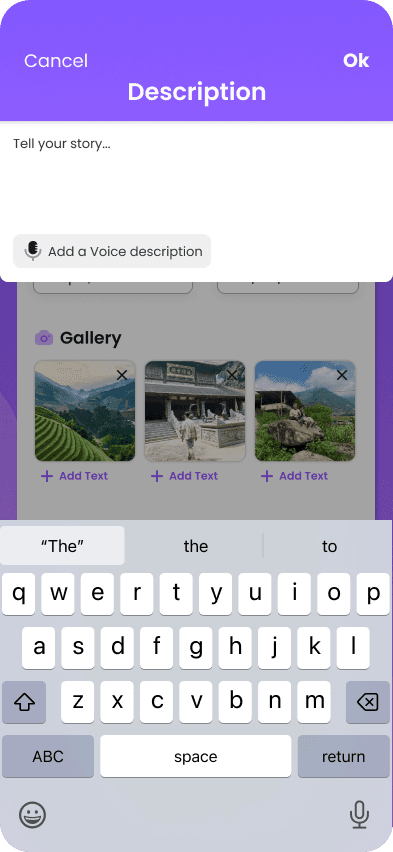
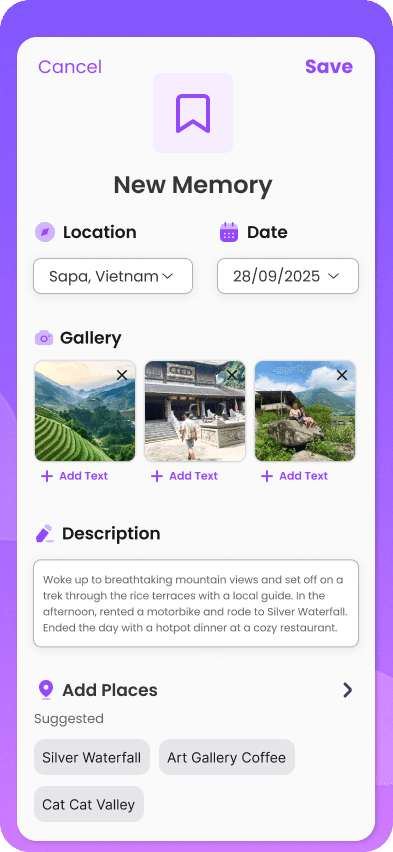
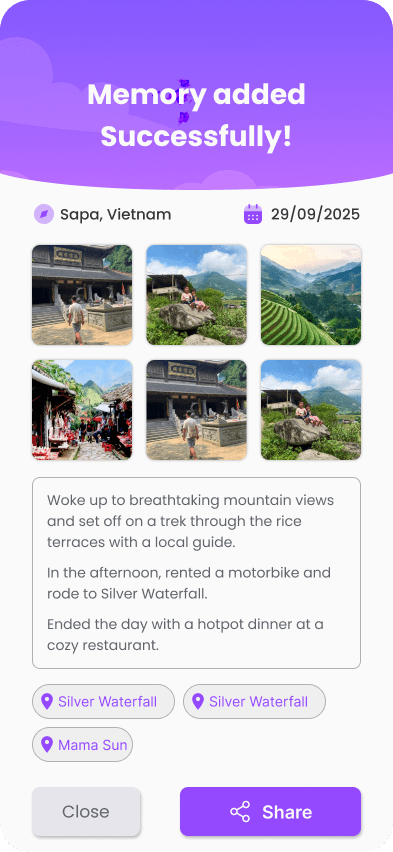
At this stage I considered whether memory logging should remain secondary or be surfaced within the trip’s main view. I decided to highlight the “New Memory” entry point on the trip homepage to encourage real-time documentation.
The hierarchy focuses on Yuval’s persona - a solo traveler seeking quick and effortless ways to capture and share experiences.
Research showed that users struggle to organize memories during trips, so I simplified the flow to three key inputs:
1. location/date (auto-filled)
2. media
3. short description
leading to a clean summary with sharing options.